- Stack
- React, TypeScript, Vite, Express, BullMQ, Redis, OpenAI, Railway
- Store
- Chrome Web Store
Overview
WaterlooWorks+ is a Chrome extension I built to make searching for co-op jobs on WaterlooWorks a little easier. It uses an LLM to extract relevant skills and requirements from job postings, then compares them against your resume to help you identify which jobs are a better match.
Instead of opening every posting individually, students can see match scores directly in the WaterlooWorks job table, along with the skills they match and the ones they're missing. This makes it easier to narrow down which jobs are worth applying to, and so far, over 100 Waterloo students have used the extension.
Demo
Background
When I first started applying for co-op jobs at Waterloo, I remember opening WaterlooWorks and seeing hundreds of postings. It was pretty overwhelming trying to figure out which jobs I was actually qualified for, especially when every posting had a long list of requirements.
I found myself constantly switching between job descriptions and my resume to see which skills I matched and what I was missing. Eventually, I thought it would be useful to have something that could do this automatically, without having to open every posting individually. That's where the idea for WaterlooWorks+ came from.
Architecture
WaterlooWorks+ consists of a React Chrome extension and an Express backend. The extension runs directly on WaterlooWorks, where it reads job postings and adds match scores to the job table. The backend handles LLM extraction, while Redis and BullMQ manage caching and background processing.
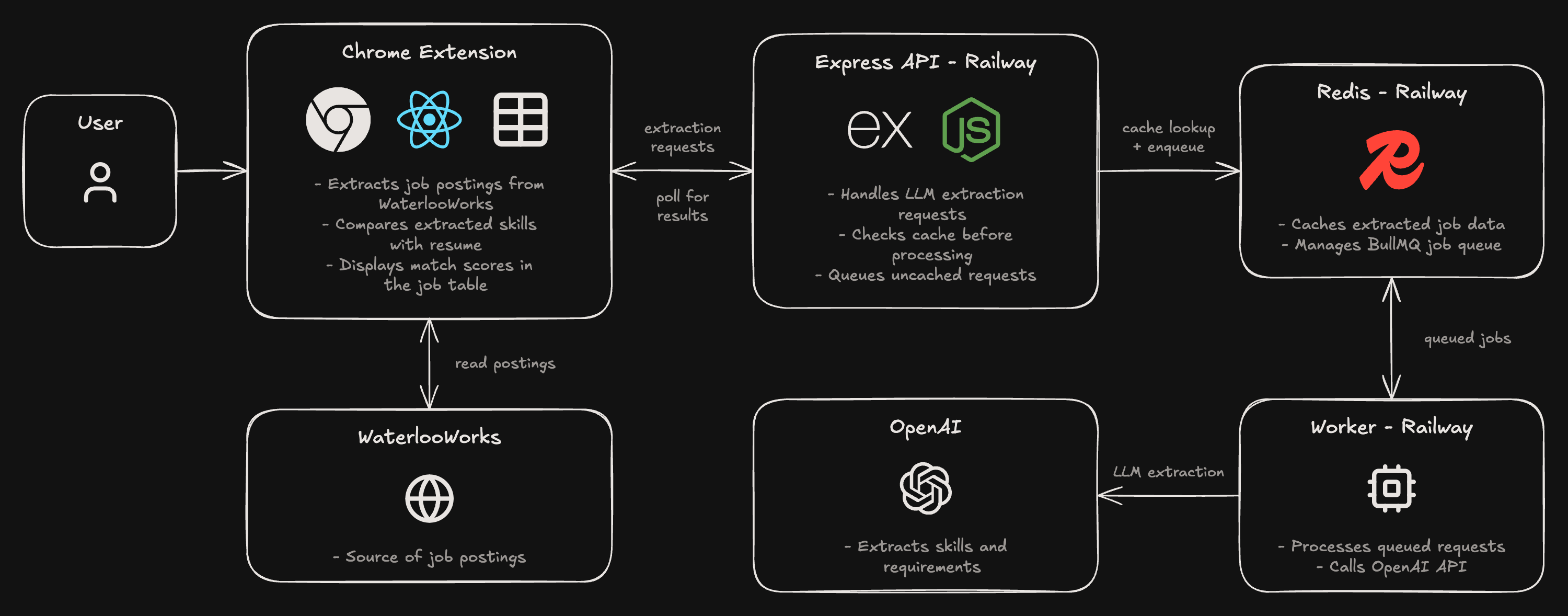
When a student analyzes a posting, the extension sends its content to the Express API. The API first checks Redis to see whether the posting has already been processed. If the result is cached, it can be returned immediately. Otherwise, the request is added to a BullMQ queue, where a background worker calls the OpenAI API to extract the relevant skills and requirements.
Once processing finishes, the extracted information is returned to the extension, which compares it against the student's resume and displays the matching results in the job table.
Chrome Extension Integration
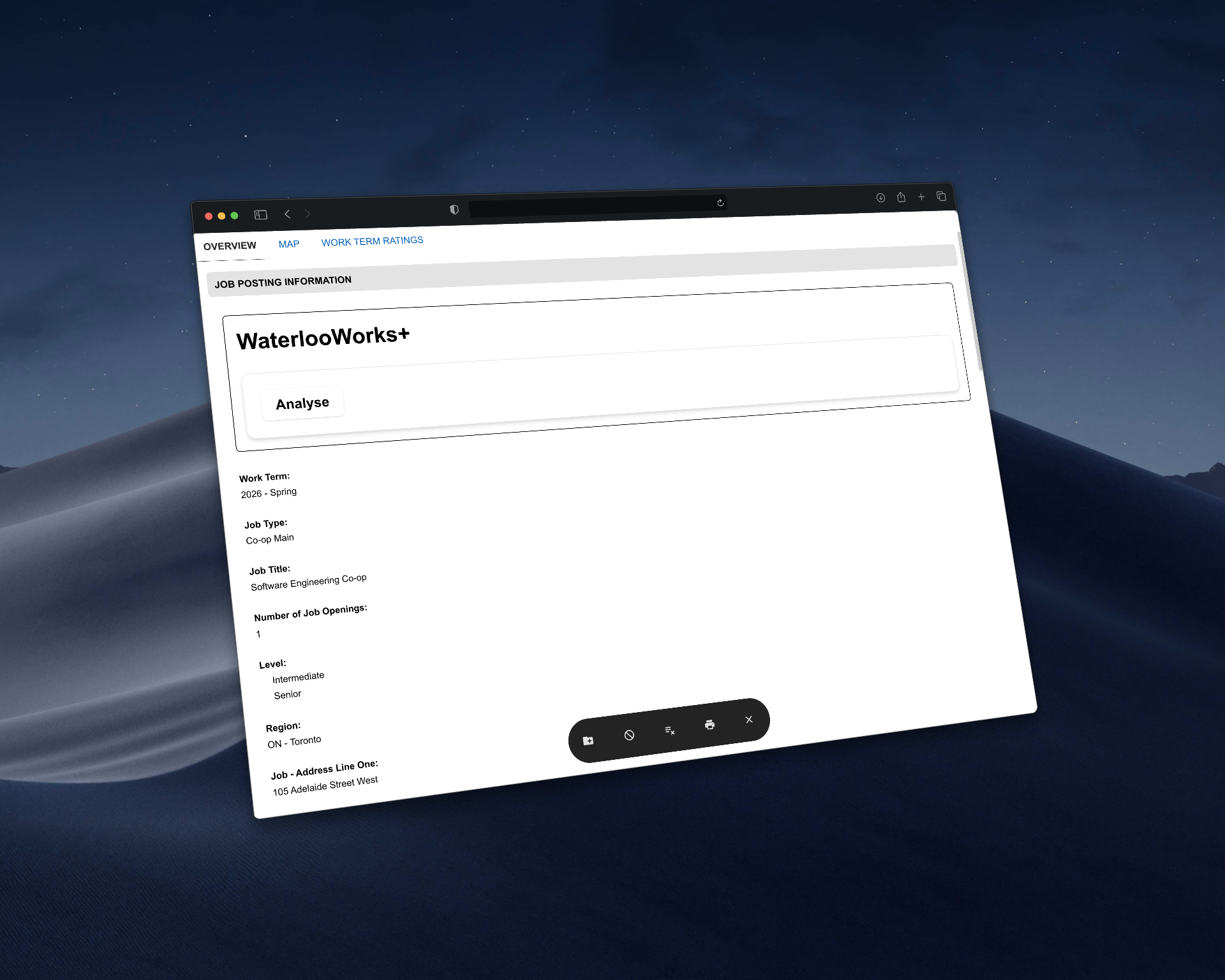
The first version of WaterlooWorks+ analyzed one job posting at a time. I later added the match column directly to the WaterlooWorks job table so students could compare multiple postings without opening each one. This introduced a few challenges, especially since the extension had to work within a website I didn't control.

Fetching Job Postings
One challenge was retrieving job descriptions without opening each posting individually. WaterlooWorks only displays basic information in the job table, while the full description is loaded through a separate request that requires an action token.
Since Chrome extension content scripts can't directly call the page's JavaScript functions, I extracted the token from the page's scripts and used it to make the same request.
1// WaterlooWorks embeds this token in its own getPostingOverview() function.2// Content scripts can't call page functions, so we read it out of the script text.3export function getOverviewAction(): string | null {4 for (const script of document.scripts) {5 const match = script.textContent?.match(6 /function getPostingOverview[\s\S]*?action:\s*'([^']+)'/7 );8 if (match) return match[1];9 }10 return null;11}To avoid making too many requests, I limited fetching to three postings at a time and cached the descriptions in Chrome's local storage for seven days. This also means revisiting the same page doesn't require fetching everything again.
Matching Skills
Once the extension has the extracted keywords from the backend, it compares them against the skills extracted from the student's resume.
One issue was that the same technology could be written in different ways. For example, Node.js, NodeJS, and node js should all count as the same skill. I added a normalization function that handles these variations while preserving distinctions such as C, C++, and C#.
1// "Node.js", "NodeJS" and "node js" all become "nodejs".2// Keeps + and # so C, C++ and C# stay distinct.3function normalize(keyword: string) {4 const n = keyword.toLowerCase().replace(/[\s.\-_]/g, "");5 return ALIASES[n] ?? n;6}Updating the Job Table
WaterlooWorks uses Vue to render its job table, which means rows can be reused when users switch pages. I had to make sure the match scores were associated with the correct posting rather than the row's position in the table.
I used a MutationObserver to detect changes and update the match column when necessary. Sorting introduced another issue because moving rows also triggered the observer, so I added a check to avoid updating the DOM when the rows were already in the correct order.
1const sorted = [...rows].sort((a, b) => score(b) - score(a));2// Only touch the DOM when the order actually changes,3// or our own move would retrigger the observer forever4if (sorted.some((row, i) => row !== rows[i])) tbody.append(...sorted);I also used Shadow DOM for the keyword hover cards to prevent WaterlooWorks' styles from interfering with the extension. Since keywords are extracted from employer-written job descriptions using an LLM, I render them as plain text rather than HTML.
Background Workers & Caching
The first version of WaterlooWorks+ made OpenAI requests directly from the Express backend. This worked when I was testing the extension myself, but I realized it wouldn't scale well once students started analyzing entire tables of job postings.
I redesigned the backend using BullMQ and Redis so LLM requests could be processed asynchronously instead of making the API wait for every response.
Asynchronous Processing
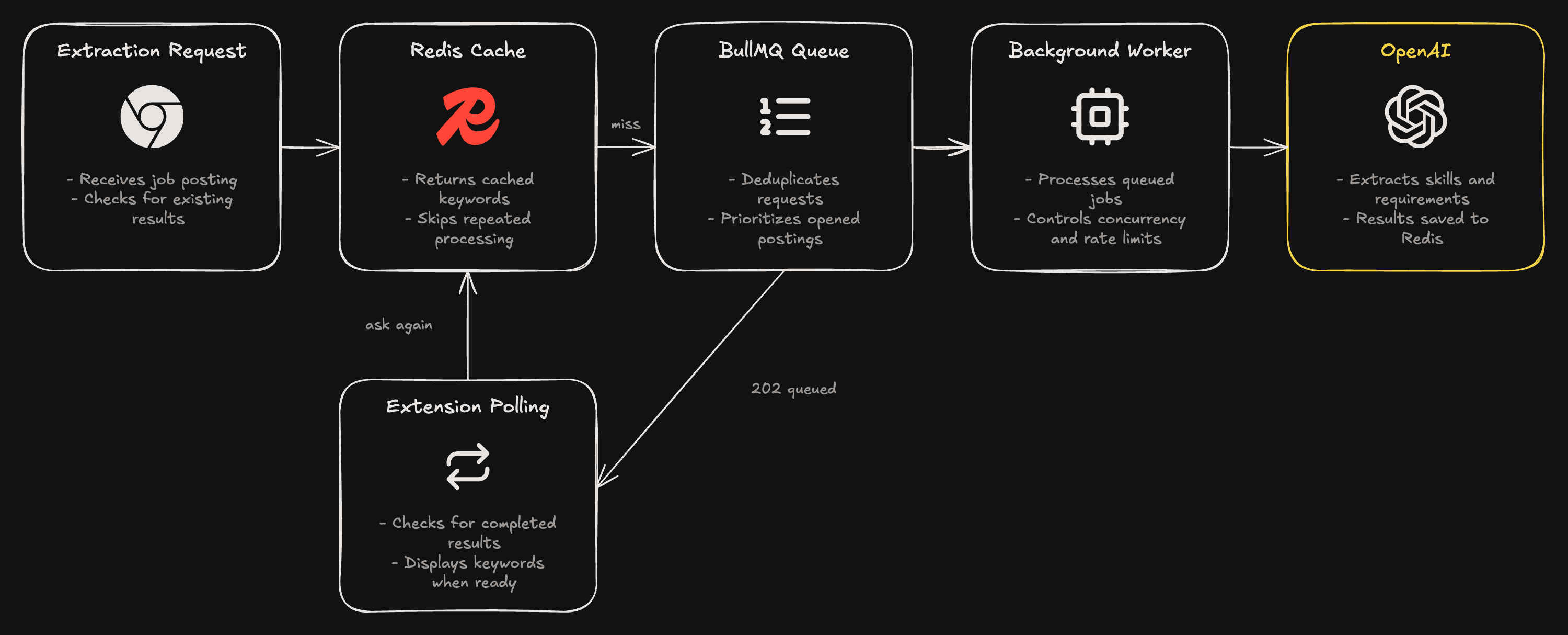
When the extension requests keywords for a posting, the backend first checks Redis for an existing result. If it's cached, the keywords are returned immediately. Otherwise, the request is added to a BullMQ queue, and the API returns a 202 Accepted response.
The extension then polls the API every 1.5 seconds until the keywords are ready. This separates receiving requests from processing them, so the server doesn't need to keep an HTTP request open while waiting for OpenAI.
1app.post("/extract/posting", async (req, res) => {2 ...3 const cached = await redis.get(cacheKey);4 if (cached) return res.json({ keywords: JSON.parse(cached) });56 const priority = opened ? OPENED_PRIORITY : BATCH_PRIORITY;7 // Same posting text = same job ID, so many students asking at once still makes one OpenAI call8 const job = await extractQueue.add("extract", { text, cacheKey },9 { jobId: cacheKey.replaceAll(":", "-"), priority });10 // If the job already existed with batch priority, bump it ahead now that the student opened it11 if (opened && (await job.getState()) === "prioritized") await job.changePriority({ priority });1213 res.status(202).json({ status: "queued" });14});Caching and Job Deduplication
A lot of students end up analyzing the same job postings, so I wanted to avoid making repeated LLM calls for identical descriptions.
I use the posting ID and a hash of its contents as the cache key. If a student requests a posting that's already been processed, the backend returns the cached keywords. If the same posting is already waiting in the queue, BullMQ uses its job ID to prevent another copy from being added.
This means multiple students can request the same posting without triggering separate OpenAI calls. The cache expires after approximately one co-op term, and changing the posting description produces a new cache key.
1// Keyed by posting ID + text hash, so an edited posting gets re-extracted.2// Only keywords are stored here, never the posting text.3export function postingCacheKey(postingId: string, text: string) {4 return `posting:${postingId}:${createHash("sha256").update(text).digest("hex")}`;5}Prioritization and Rate Limiting
Processing an entire job table can generate dozens of requests, but not all of them are equally important.
I added two priority levels. Background requests for the job table use a lower priority, while postings that a student explicitly opens are moved ahead in the queue. This helps the extension respond faster to what the student is actively looking at.
The worker processes up to five jobs concurrently, with a rate limit of ten OpenAI calls per second. Failed jobs can retry up to three times with exponential backoff.
1const worker = new Worker<ExtractJob>(2 "extract-posting",3 async (job) => {4 const keywords = await extractPostingKeywords(job.data.text);5 await redis.set(job.data.cacheKey, JSON.stringify(keywords), { EX: CACHE_SECONDS });6 },7 {8 connection,9 concurrency: 5,10 // Global across every worker process, so OpenAI sees one steady rate no matter how many users11 limiter: { max: 10, duration: 1000 },12 }13);I also remove completed and failed jobs from BullMQ so the queue doesn't accumulate old entries. The extracted results are stored separately in Redis.
1defaultJobOptions: {2 attempts: 3,3 backoff: { type: "exponential", delay: 2000 },4 // Jobs hold posting text, so delete them once done; the keywords live on in the cache.5 // Removing failed jobs too lets the same posting be re-queued instead of stuck forever.6 removeOnComplete: true,7 removeOnFail: true,8},Lessons Learned
One thing I'd improve about WaterlooWorks+ is how the extension handles asynchronous requests. Right now, it polls the backend every 1.5 seconds while waiting for extracted keywords. This works, but it also creates unnecessary requests when lots of postings are being processed. I'd like to explore a way for the backend to notify the extension when results are ready instead.
Another limitation is how I match skills between resumes and job postings. Currently, I normalize keywords and use a small list of aliases to handle variations like k8s and Kubernetes. This works for common cases, but maintaining those aliases manually isn't ideal. I'd like to experiment with semantic matching to recognize related skills without relying entirely on exact keyword matches.
I also learned how challenging it can be to build software on top of a website you don't control. WaterlooWorks+ relies on the current structure of WaterlooWorks, so changes to its page scripts or job table could break parts of the extension. In the future, I'd want to make those integrations easier to maintain and more resilient to changes.