- Stack
- Python, LangGraph, LangChain, MCP, OpenAI, SQLite
Overview
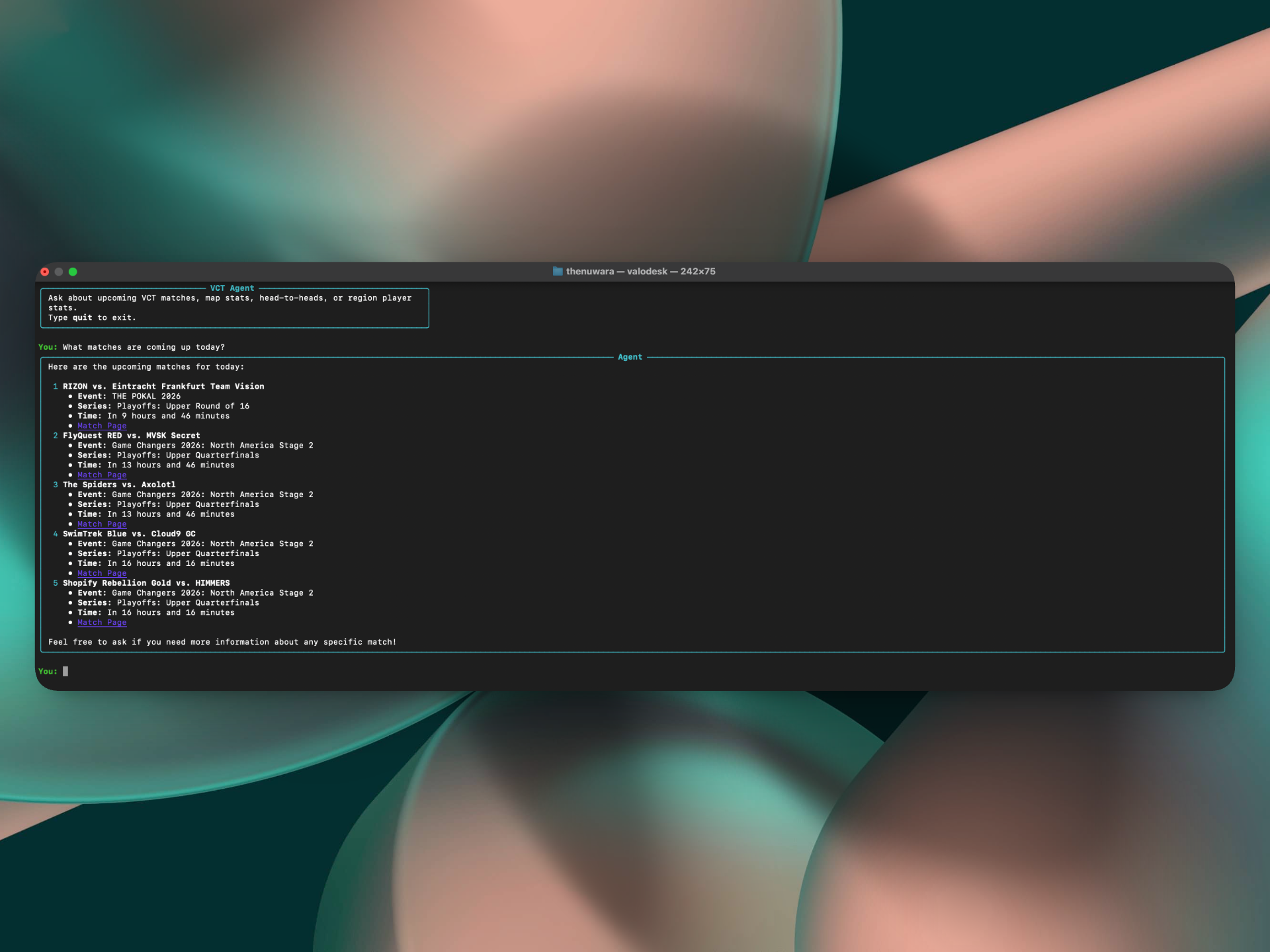
ValoDesk is a conversational CLI for asking questions about Valorant Champions Tour esports. You can ask about upcoming matches, map records, head-to-heads, or regional player leaderboards directly from the terminal.
Under the hood, a LangGraph agent decides which tool it needs based on the question. Those tools are exposed through a local MCP server and pull VCT data using vlrggapi, an unofficial API wrapper around vlr.gg. Conversations are stored in SQLite, so follow-ups work without having to repeat the team or previous question. You can also close ValoDesk and come back to an old conversation later.
All match and stats data comes through vlrggapi, created by axsddlr.
Demo
Background
I built ValoDesk because I kept looking up VCT stats while watching matches. Something simple like checking a team's record on a certain map or seeing how two teams had done against each other usually meant jumping through a few pages on vlr.gg.
I thought it would be a lot nicer if I could just ask for the stat directly from my terminal and get the answer back, which is what ValoDesk became.
Architecture
ValoDesk is built around a Python CLI, a LangGraph agent, and a custom MCP server. Everything runs locally on the user's machine, apart from the external APIs used to retrieve esports statistics and generate LLM responses.
I chose to run the MCP server as a separate process that communicates with the agent through standard input and output (stdio). This means users can run ValoDesk directly from their terminal without having to configure or host a separate server.
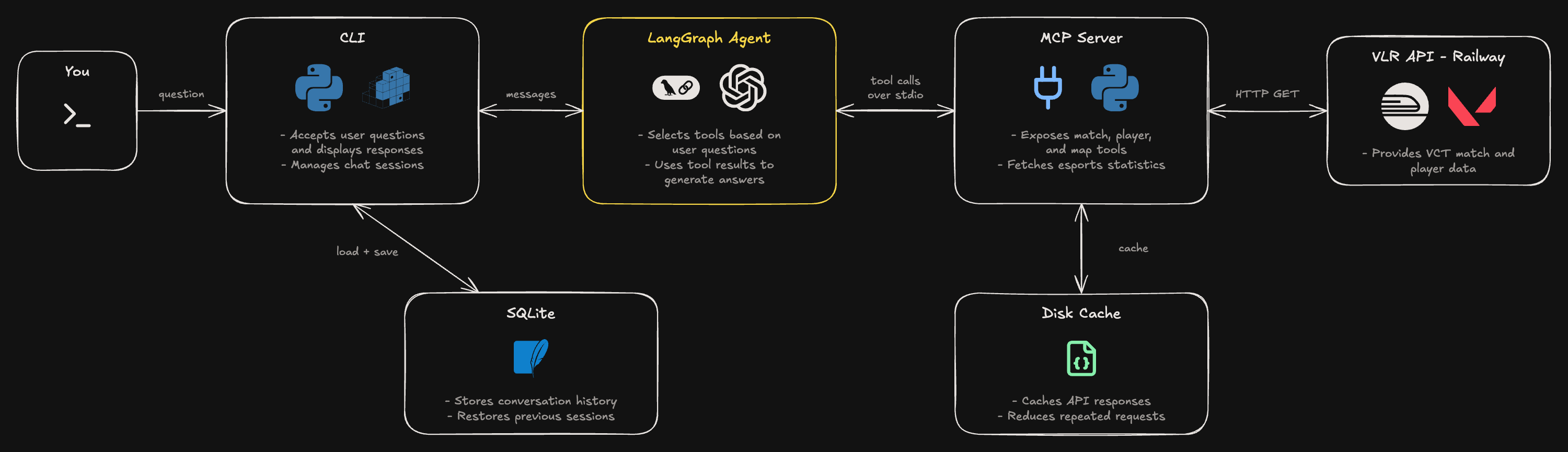
Tools are exposed through the MCP server, which fetches match or player statistics from a vlrggapi instance hosted on Railway. The results are returned to the agent, which uses them to generate a response in the terminal.
I also use SQLite to store conversation history between sessions, so users can return to previous chats. The MCP server maintains a local disk cache for API responses to avoid repeatedly fetching the same statistics.
Agent & MCP Tools
One thing I wanted with ValoDesk was the ability to ask questions naturally without having to remember specific commands or API endpoints. I used LangGraph to build an agent that can decide which tools to call based on the user's question.
How the Agent Works
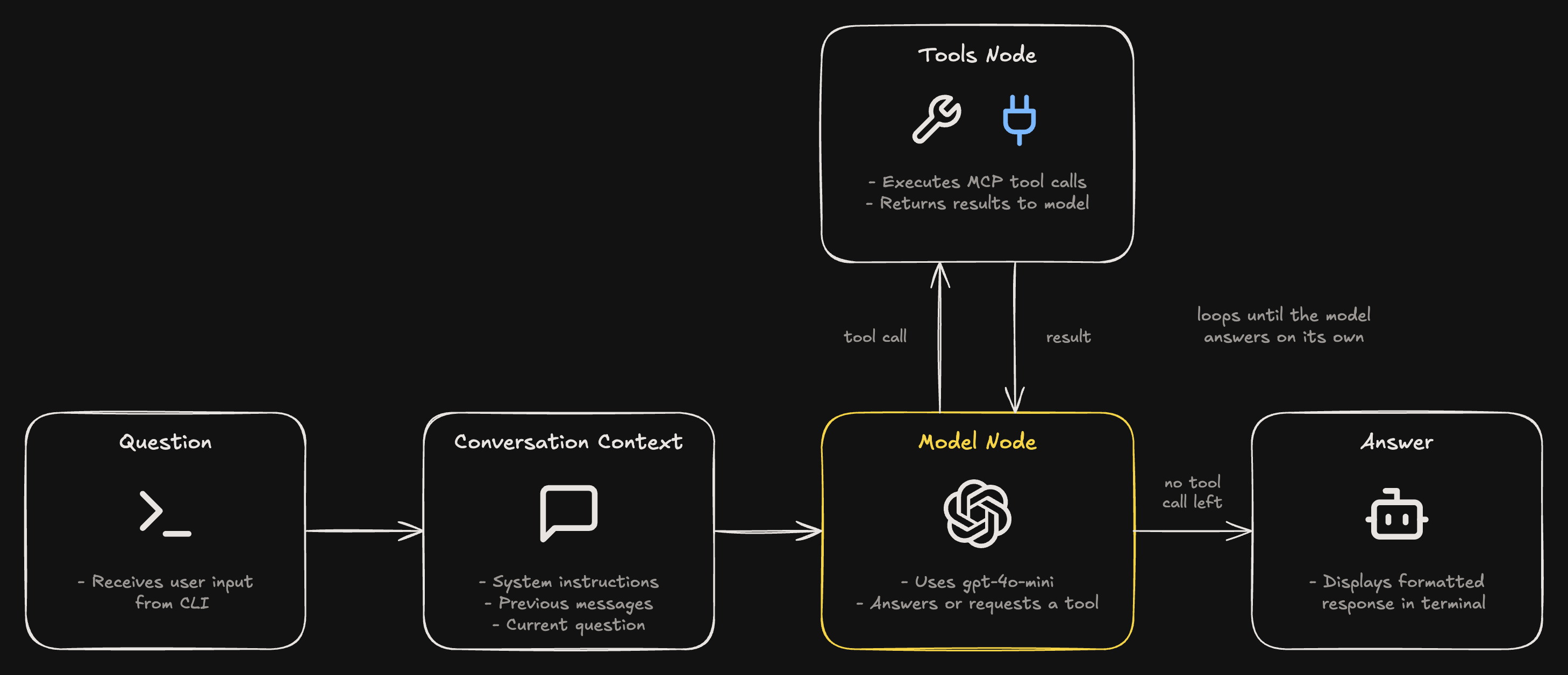
When a user asks a question, the agent receives their message along with a list of available tools exposed through my MCP server. It uses gpt-4o-mini to decide whether it needs additional information and, if so, which tool to call.
For example, if someone asks about G2's record on Ascent, the agent can call get_map_stats to retrieve the team's performance on that map. The tool returns structured data, which the agent uses to generate its answer. Here, that's the Ascent row with G2's games, wins, losses and win rate, which the agent turns into a short summary.
1You: What's G2's record on Ascent?23# the agent picks a tool and fills in the arguments4get_map_stats(team_name="G2", map_name="Ascent")56# the tool returns that map's row from the VLR API (trimmed)7{"map": "Ascent", "games": 41, "win_pct": "63%", "wins": 26, "losses": 15, ...}89Agent: G2's record on Ascent is as follows:10- Total games: 4111- Wins: 2612- Losses: 1513- Win percentage: 63%This process can repeat if the agent needs information from multiple tools before answering.
1model = ChatOpenAI(model="gpt-4o-mini")23mcp_client = MultiServerMCPClient({4 "valodesk": {5 "command": sys.executable,6 "args": ["-m", "valodesk.mcp_server"],7 "transport": "stdio",8 }9})10...11tools = await mcp_client.get_tools()12agent = create_agent(13 model=model,14 tools=tools,15 system_prompt=SYSTEM_PROMPT,16)Custom MCP Server
The tools themselves are plain Python functions in vlr_client.py. Each one calls the VLR API, narrows the response down to what the question needs, and returns it as JSON. For example, get_map_stats looks up the team, fetches its map stats, and returns just the row for the map you asked about.
I used FastMCP to expose these functions as MCP tools, which takes one line per function. FastMCP builds each tool's description from the function's type hints and docstring, so the docstrings double as the instructions the model reads when deciding which tool to use.
1from mcp.server.fastmcp import FastMCP23from .vlr_client import get_h2h, get_map_stats, get_matches, get_region_stats45mcp = FastMCP("valodesk")67mcp.tool()(get_matches)8mcp.tool()(get_map_stats)9mcp.tool()(get_h2h)10mcp.tool()(get_region_stats)1112if __name__ == "__main__":13 mcp.run(transport="stdio")The tools take team names like “G2”, not vlr.gg IDs, so each one first searches for the team and skips inactive or retired rosters with similar names.
My first version had the agent import these functions directly. I later moved them behind the MCP server, so the agent now discovers its tools over the protocol when it starts instead of importing them. That keeps the data fetching in its own process, separate from the agent.
Handling Missing Information
One issue I wanted to avoid was the model making up statistics when it couldn't find the information it needed.
I added instructions to the system prompt telling the agent to rely on tool results rather than guessing. If a question is missing important context, such as which team or map the user means, the agent asks for clarification instead of making assumptions.
If the available tools can't answer a question, the agent is instructed to say so rather than inventing a result.
Conversation Persistence
I wanted users to be able to close ValoDesk and return to previous conversations without losing their context.
My first implementation used LangGraph's in-memory checkpointer, which allowed follow-up questions within the same session but lost everything when the CLI closed.
I later replaced this with SQLite, using separate tables for conversations and messages. Before each question, I load the conversation's previous messages and include them in the agent's context. After generating a response, I save both the user's question and the final answer.
1async def ask(agent, conversation_id: int, question: str) -> str:2 history = get_messages(conversation_id)3 result = await agent.ainvoke(4 {"messages": history + [{"role": "user", "content": question}]}5 )6 answer = result["messages"][-1].content78 save_message(conversation_id, "user", question)9 save_message(conversation_id, "assistant", answer)10 set_conversation_title(conversation_id, question)1112 return answerI also added commands to create, list, and resume conversations directly from the CLI.
One limitation is that I only store the user's questions and the agent's final responses, not the intermediate tool calls. This keeps the database simple, but it means the agent sometimes has to retrieve the same data again when a user resumes a conversation.
Lessons Learned
One thing I'd improve about ValoDesk is how conversation history is handled. Currently, I save user messages and final responses in SQLite, but not the intermediate tool calls. I also pass the entire conversation back to the model for every question, which becomes increasingly expensive as conversations get longer.
I also learned how much an agent depends on the quality of its tools and the data they return. ValoDesk relies on an unofficial VCT statistics API, which has limitations in how much data it exposes and how teams are identified. Even when the agent chooses the correct tool, an incomplete or incorrect API result can lead to a poor answer. I'd want to improve how ambiguous team names are handled and make these limitations clearer to users.