
- Stack
- Next.js, FastAPI, Python, TypeScript, Three.js, OpenAI, ChromaDB
Overview
GitBoarding takes any GitHub repository and turns it into an interactive 3D map of the codebase. It looks at how files import and connect to one another, then makes the more important files stand out so users can quickly understand where to start. Alongside the visualisation, there is also a chat feature that lets users ask questions about the repository and get answers based on the actual source code. I also containerized the backend with Docker and set up automated deployment through GitHub Actions.
Demo
Background
Onboarding to a new codebase is one of the slowest parts of joining a project. Reading through files and folders and trying to understand how each part of the codebase works can often take hours, if not days. GitBoarding is a project I built with the hope of reducing that time by providing a faster, more visual way to understand how a codebase is structured and allowing users to ask questions about a repository as if they were speaking to a person.
Architecture
GitBoarding uses a Next.js frontend hosted on Vercel and a FastAPI backend deployed on Railway using Docker. I kept the repository processing on the backend since it handles fetching files from GitHub, building the dependency graph, and preparing the codebase for the RAG chatbot. The frontend is mainly responsible for displaying the 3D graph and handling the chat interface.
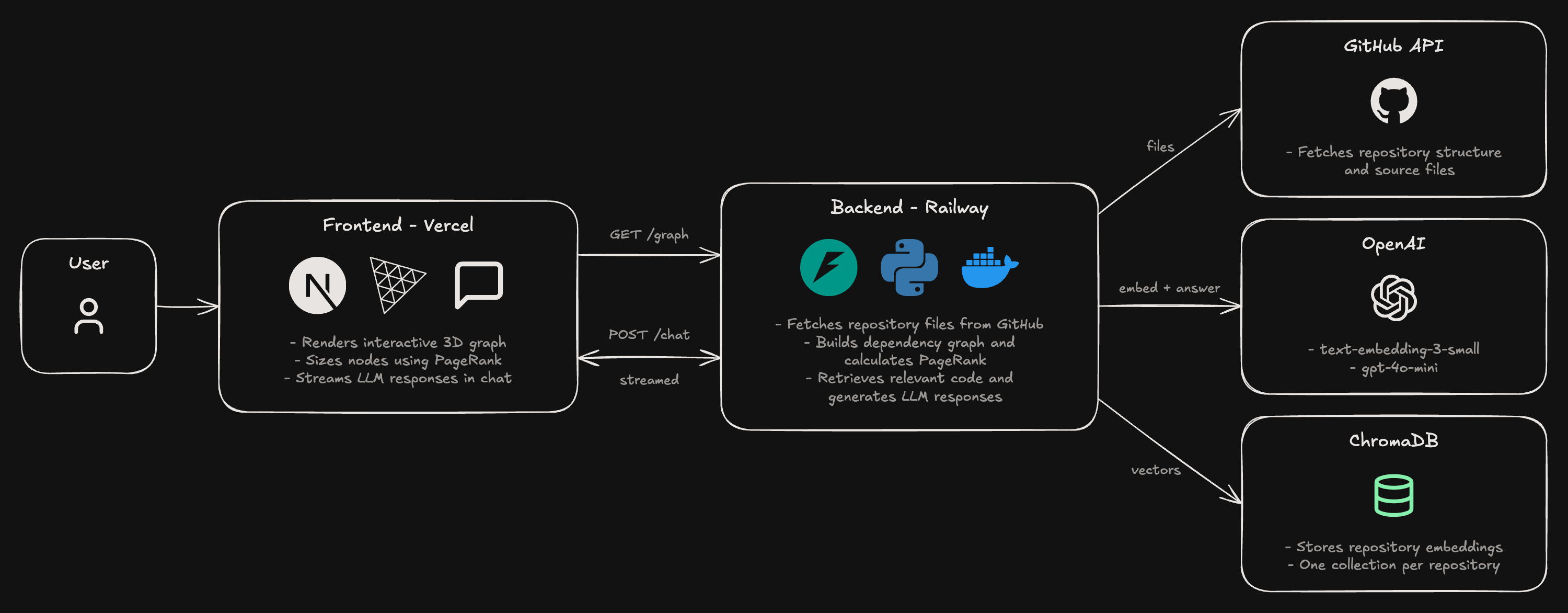
When a user enters a GitHub repository, the frontend sends a request to the backend, which fetches the repository's files through the GitHub API. It then builds a dependency graph based on file imports and stores embeddings of the repository's contents in ChromaDB.
Once that's done, the frontend displays the graph using Three.js, with node sizes determined by PageRankPageRank is an algorithm that measures the importance of a node based on its connections to other nodes. A node is considered more important when other important nodes link to it.. The user can also ask questions about the repository, which are sent through a Next.js API route to the FastAPI backend. The backend retrieves relevant code from ChromaDB, passes it to the LLM, and streams the response back to the chat interface.
3D Graph
To visualize a repository, I first needed to figure out how its files connect to one another. I decided to use imports to represent these relationships, where each file becomes a node and each import becomes an edge.
Building the dependency graph
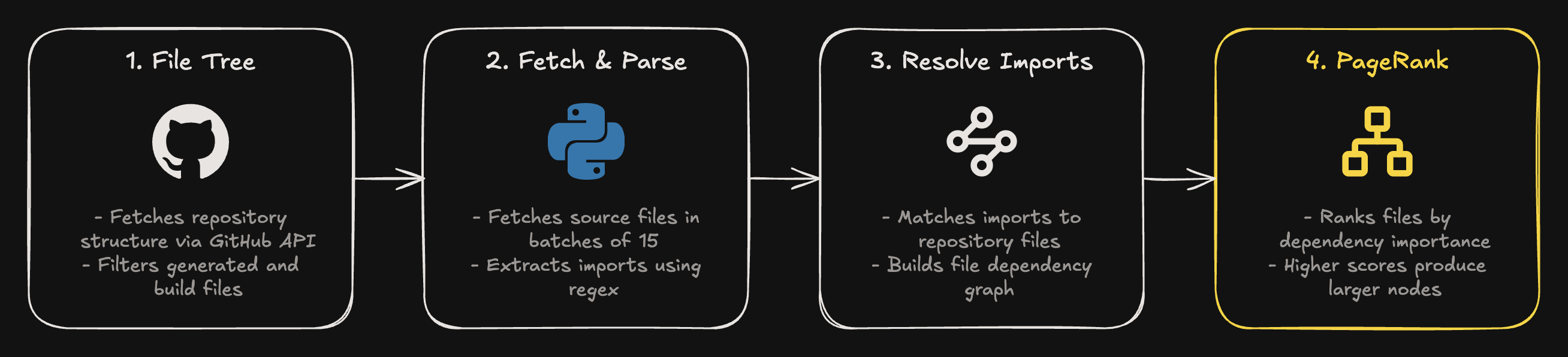
I start by fetching the repository's file tree through the GitHub API. Rather than downloading everything, I filter out generated files and build directories like dist/ and .next/, since they aren't particularly useful for understanding the codebase.
The backend then fetches the remaining files in batches of 15 and uses regex patterns to extract imports from Python, JavaScript, TypeScript, and Java files.
One challenge was matching these imports to actual files. For example, an import like ./utils doesn't specify whether it's referring to utils.py, utils.ts, or an index.js file inside a folder. To handle this, I wrote a resolver that checks possible file extensions and index files before falling back to matching filenames.
1def _resolve_import(raw: str, source_file: str, all_files: set[str]) -> str | None:2 source_dir = os.path.dirname(source_file)3 candidate = raw.strip("/")45 if raw.startswith("."):6 candidate = os.path.normpath(os.path.join(source_dir, raw))78 for ext in ["", ".py", ".js", ".ts", ".go", ".java", ".rs", "/index.js", "/index.ts"]:9 if candidate + ext in all_files:10 return candidate + ext1112 basename = candidate.split("/")[-1]13 for f in all_files:14 if os.path.splitext(os.path.basename(f))[0] == basename:15 return f16 return NoneIdentifying important files with PageRank
Once I had the dependency graph, I wanted a way to highlight files that might be useful starting points for someone exploring the repository.
I used PageRank through NetworkX to calculate the importance of each file based on its connections. Unlike simply counting imports, PageRank also considers how important the files making those imports are.
I then use these scores to determine the size of each node, making higher-ranked files stand out in the visualization.
1# inference/graph_builder.py2pagerank = nx.pagerank(G, alpha=0.85)3nx.set_node_attributes(G, pagerank, "pagerank")45// web/components/Graph3D.tsx6val: Math.max(1, n.pagerank * 400), // node size from pagerankVisualizing the graph
The frontend uses Three.js to render the dependency graph in 3D. Each node represents a file, and the edges show the import relationships between files.
I use the PageRank scores calculated by the backend to scale the nodes, so users can quickly identify potentially important files rather than treating every file equally.
RAG Chatbot
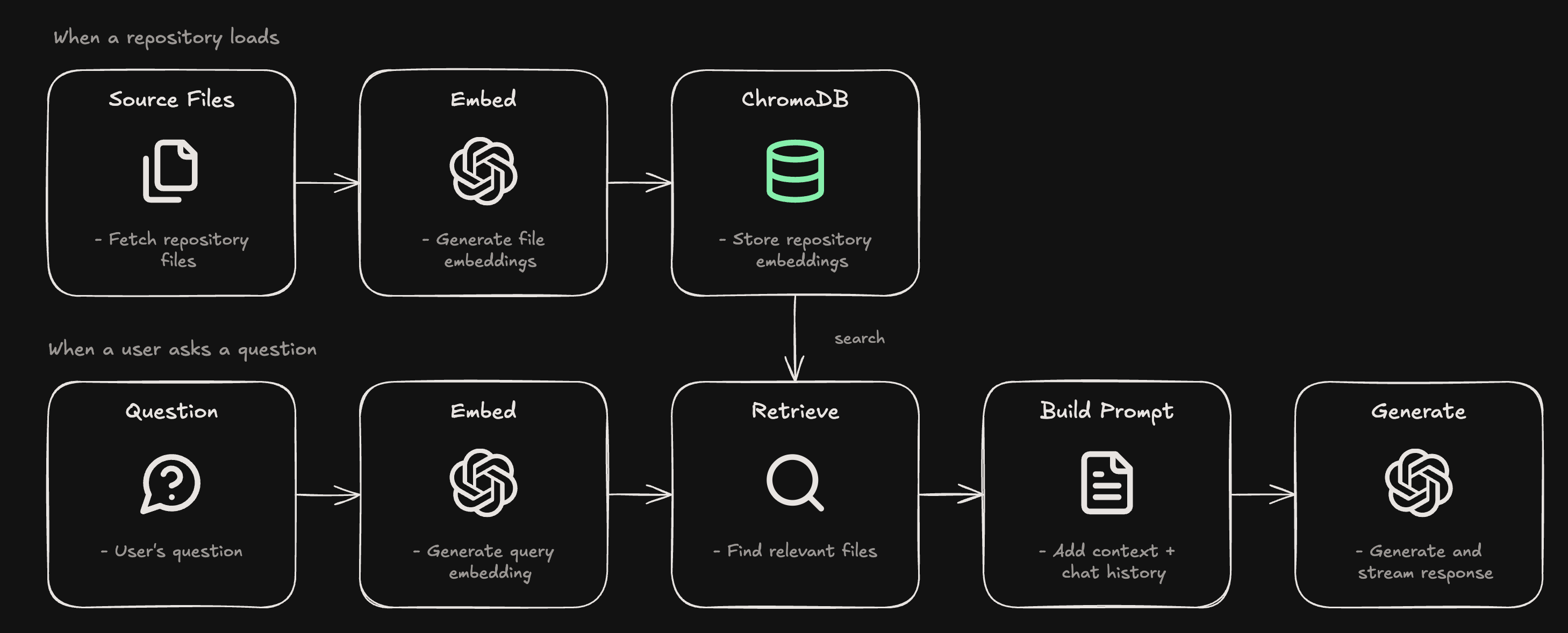
One challenge with building a chatbot for GitHub repositories is figuring out how to give the LLM enough context without passing in the entire codebase. I used retrieval augmented generation (RAG) to find relevant source files based on the user's question and include them in the prompt.
Indexing the Repository
When someone opens a repository, the backend fetches its source files and generates embeddings using OpenAI's text-embedding-3-small model. These embeddings are stored in ChromaDB, allowing me to search for relevant files later.
I also wanted to avoid generating embeddings every time someone opened the same repository. To handle this, I used the repository's latest push timestamp as part of the ChromaDB collection name. If the collection already exists, the backend skips indexing. If the repository has been updated, a new collection is created.
1def _collection_name(owner: str, repo: str, pushed_at: str) -> str:2 return f"{owner}_{repo}_{pushed_at}".replace("/", "_").replace(":", "_")34async def index_repo(owner, repo, pushed_at, file_contents):5 name = _collection_name(owner, repo, pushed_at)6 if any(c.name == name for c in client.list_collections()):7 return # already indexed for this repo + pushed_at8 ...Retrieving Context and Generating Responses
When a user asks a question, I generate an embedding of their query using the same model and search ChromaDB for the six closest files. I then filter out results below a similarity score of 0.2 to avoid including files that aren't particularly relevant.
Alongside the retrieved files, I include the repository's README and dependency manifests, such as package.json or requirements.txt, to give the model some general context about the project. I also include the last six chat messages so users can ask follow-up questions.
The resulting prompt is sent to gpt-4o-mini, and the response is streamed back to the frontend using server-sent events.
1results = collection.query(query_embeddings=[query_vector], n_results=top_k)23matches = []4for path, distance in zip(results["ids"][0], results["distances"][0]):5 similarity = 1 - distance # Chroma returns cosine distance6 if similarity >= floor: # floor = 0.27 matches.append(path)8return matchesEarlier Retrieval Approaches
My first approach didn't actually use embeddings. I initially grouped files into modules based on their import relationships and tried to identify relevant files by navigating those groups. I later experimented with grouping files by directory structure, but neither approach worked particularly well for questions that didn't directly correspond to the repository's organization.
I eventually switched to embedding based retrieval, which let me search using the actual contents of files rather than relying entirely on their location or dependencies.
Handling Large Files
Another issue I encountered was repositories containing files too large for the embedding requests. I added a fallback that truncates file contents to 20,000 characters and retries indexing. If indexing still fails, the 3D graph remains available even though the chatbot may not work for that repository.
1try:2 vectors = await _embed_texts(contents)3except Exception:4 contents = [c[:MAX_EMBED_CHARS] for c in contents] # 20,000 chars5 vectors = await _embed_texts(contents)This is still a limitation of the current implementation, since truncating files can leave out relevant code. A better approach would be to split larger files into smaller chunks and retrieve those independently.
Lessons Learned
One thing I'd change about GitBoarding is how I handle embeddings. Currently, each file gets a single embedding, which works for smaller files but becomes less useful for larger ones. Splitting files into smaller chunks would allow the chatbot to retrieve specific parts of a file rather than relying on a single embedding to represent everything.
I also learned that extracting file dependencies is more complicated than just looking for imports. My regex approach works for common import patterns, but it can't handle everything, especially dynamic imports. If I were to revisit this, I'd look into using language specific parsers to build a more accurate dependency graph.