- Stack
- React Native (Expo), Python, FastAPI, PyTorch, YOLOv11, EasyOCR, OpenCV
Overview
Clarity is a mobile app I built to help people with visual impairments read text that might otherwise be difficult to see, whether it's small print on a product label or a sign across the room.
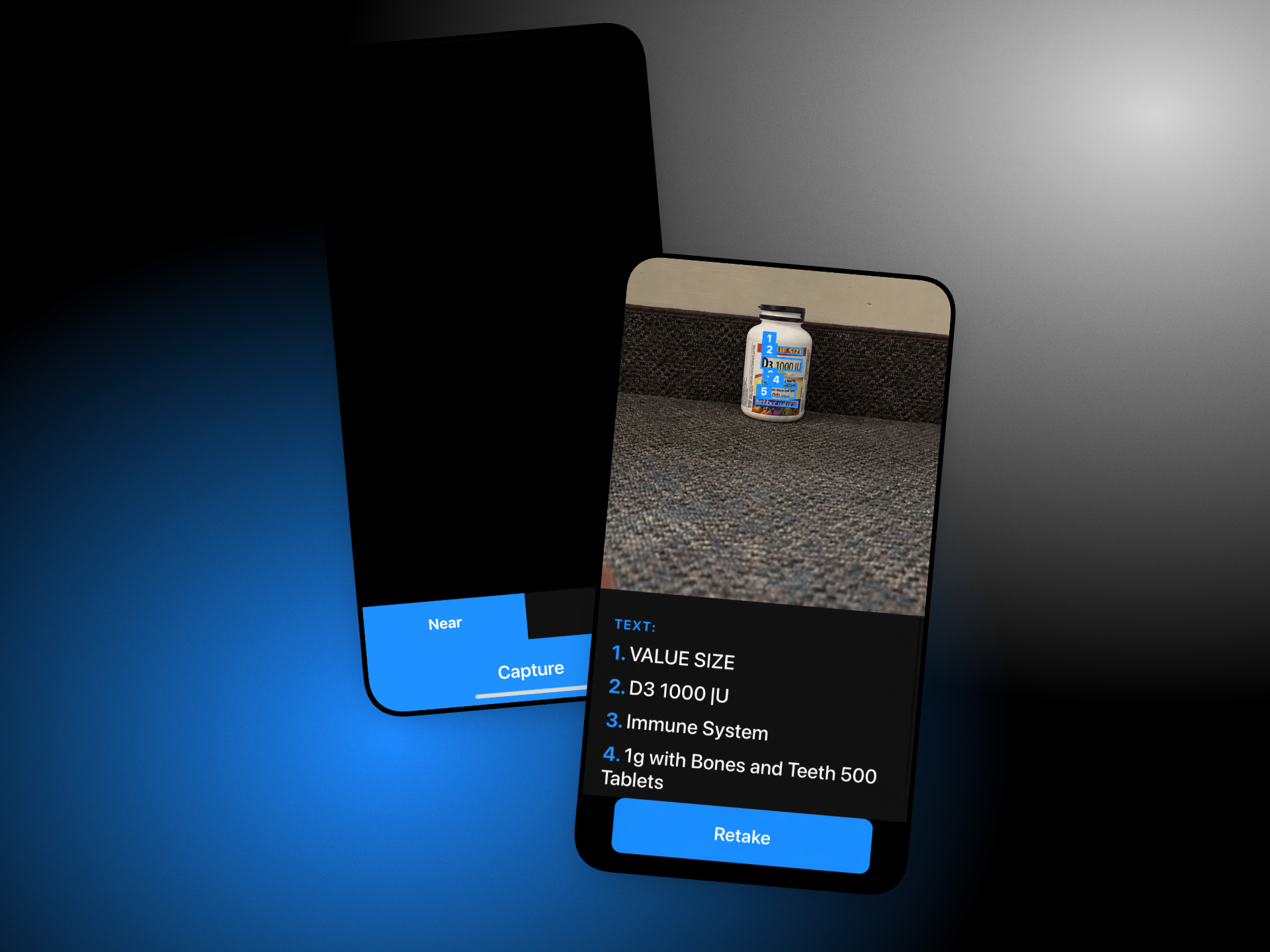
Users can take a picture of something they want to read, and the app extracts the text into a list of individual lines. They can then tap any line to have it read aloud.
I built two modes depending on how far away the text is. Near mode is designed for things like labels and documents, while Far mode helps identify and read text from more distant objects, such as signs.
Background
I initially built Clarity to explore how computer vision could help people with visual impairments in their day to day lives. My first version used a pretrained YOLO model to identify objects through the phone's camera, but I eventually realized that simply telling someone what objects were in front of them wasn't particularly useful.
I decided to focus on reading text instead, since something as simple as reading a product label or a sign across the street can be difficult for someone with low vision.
One challenge I discovered was that reading nearby text and distant text are two very different problems. Traditional OCR worked reasonably well for close-up images, but struggled when text was too small to detect. This led me to develop separate Near and Far modes, with the latter using a fine-tuned YOLO model to locate text before passing it through OCR.
Architecture
Clarity uses a React Native frontend built with Expo and a Python backend using FastAPI. I decided to run the computer vision models on the backend rather than on the phone, since the PyTorch models couldn't run directly in my Expo Go environment. Currently, the backend runs locally on my laptop, with the app communicating with it over Wi-Fi.
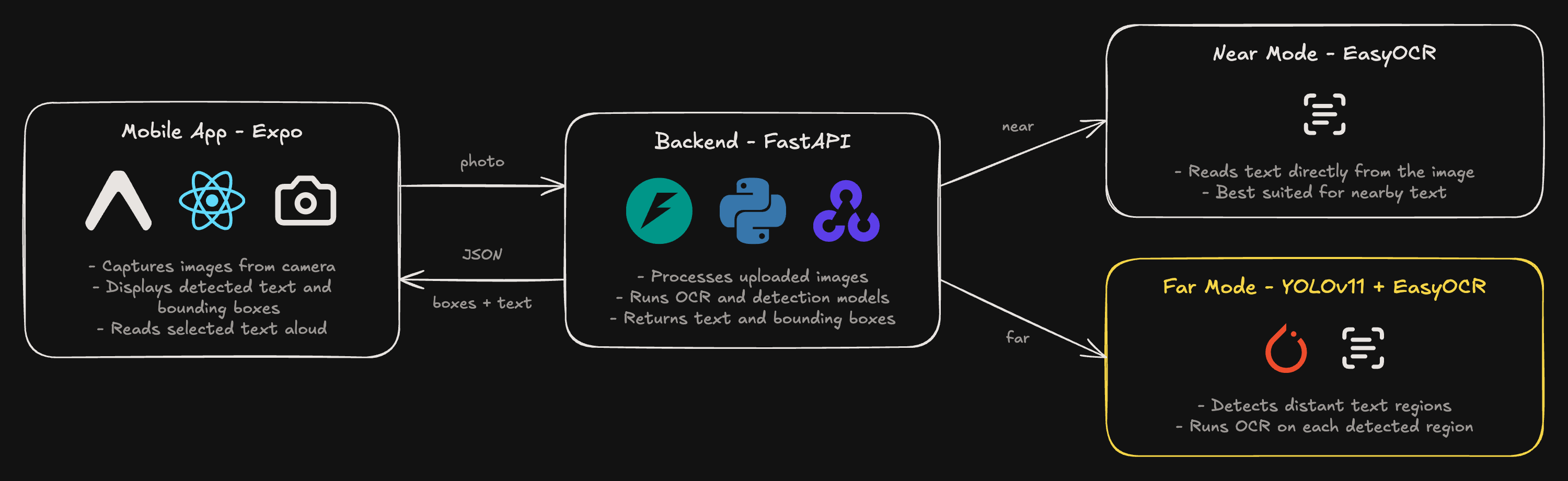
When a user takes a picture, the app sends it to the FastAPI backend for processing. Depending on which mode the user selects, the backend either runs EasyOCR on the entire image or uses YOLOv11 to detect text regions before passing them to EasyOCR.
The backend returns the extracted text along with its bounding boxes. The app then displays the results over the original image, allowing users to tap individual lines and have them read aloud.
To avoid loading the models for every request, I initialize them when the backend starts so subsequent requests only need to run inference.
Fine-tuning YOLOv11
EasyOCR has its own text detection system, but I found that it struggled with small, distant text. For Far mode, I decided to fine-tune a separate YOLOv11 model to detect text regions before passing them to EasyOCR for recognition.

Training
I started with yolo11m, a pretrained YOLOv11 model, and fine-tuned it on approximately 1,200 images from the ICDAR scene text dataset. The dataset contains text in real-world environments, including signs and storefronts.
I treated text detection as a single-class object detection problem, where the model learns to predict bounding boxes around text regions.
I trained the model for 50 epochs at an image size of 640 pixels using a Kaggle GPU, rather than training a new model from scratch.
Evaluation
On the validation set, the model achieved the following results:
| Metric | Score |
|---|---|
| mAP@0.5 | 0.63 |
| mAP@0.5:0.95 | 0.39 |
| Precision | 0.69 |
| Recall | 0.58 |
The model achieved an mAP@0.5 of 0.63, but performance dropped when evaluated using stricter bounding box overlap thresholds. The recall of 0.58 also shows that it still misses a fair number of text regions.
These results gave me a working detector for Far mode, although there's still room to improve its accuracy, particularly on smaller text.
1# saved by Ultralytics inside the checkpoint2train_args = {"model": "yolo11m.pt", "epochs": 50, "imgsz": 640, "batch": 6, ...}3train_metrics = {4 "metrics/precision(B)": 0.69284,5 "metrics/recall(B)": 0.58071,6 "metrics/mAP50(B)": 0.63295,7 "metrics/mAP50-95(B)": 0.38951,8 ...9}Inference
When a user takes a picture in Far mode, the backend runs the fine-tuned YOLOv11 model to identify potential text regions. I use a confidence threshold of 0.25 to filter out lower-confidence predictions.
The model returns bounding boxes in the original image's coordinates, which are then used to crop the detected regions before passing them to EasyOCR.
I also load the model once when the FastAPI server starts, rather than initializing it for every request.
1# Load models once at startup, not per request2reader = easyocr.Reader(["en"])3text_detector = YOLO("text_detector.pt")4TEXT_MIN_CONFIDENCE = 0.2556def _detect_text_regions(img):7 results = text_detector(img, conf=TEXT_MIN_CONFIDENCE, verbose=False)[0]8 return [[int(v) for v in b.xyxy[0].tolist()] for b in results.boxes] # [x1, y1, x2, y2]Tradeoffs
One limitation of this approach is that Far mode runs both YOLOv11 and EasyOCR. The YOLO model identifies where text might be, but EasyOCR still runs its own detection and recognition on each cropped region.
This adds processing time, especially when an image contains multiple text regions. Since the backend currently runs on my laptop's CPU, the delay can become noticeable.
One improvement I'd explore is using a text recognition model directly on the YOLO crops, rather than running a second text detector through EasyOCR.
Text Recognition Pipeline
After YOLO detects the text regions, I still need to extract the actual text and arrange it in an order that makes sense when read aloud. I built a pipeline that merges nearby detections, crops them from the original image, runs OCR, and sorts the results into reading order.

Merging Text Regions
One problem I encountered was that YOLO would sometimes detect individual words instead of entire lines. If I passed those boxes directly to EasyOCR, a single sentence could end up being read as several separate fragments.
To handle this, I wrote a function that merges boxes when they're roughly on the same line and close together horizontally. I use the height of the detected boxes to determine whether they're close enough, rather than relying on fixed pixel distances.
1def _merge_lines(boxes):2 boxes = sorted(boxes, key=lambda b: b[1]) # sort from top to bottom3 lines = []4 for box in boxes:5 x1, y1, x2, y2 = box6 cy, bh = (y1 + y2) / 2, y2 - y17 placed = False8 for line in lines:9 lx1, ly1, lx2, ly2 = line["box"]10 lcy = (ly1 + ly2) / 211 gap = max(x1, lx1) - min(x2, lx2) # negative if they overlap12 same_row = abs(cy - lcy) < bh * 0.6 # checking if vertically close13 close_x = gap <= bh * 1.5 # checking if horizontally close14 if same_row and close_x:15 line["box"] = [min(lx1, x1), min(ly1, y1), max(lx2, x2), max(ly2, y2)]16 placed = True17 break18 if not placed:19 lines.append({"box": [x1, y1, x2, y2]})20 return [l["box"] for l in lines]Cropping and Recognizing Text
YOLO runs detection on a resized image, but I use the original photo when cropping text regions for EasyOCR. This preserves as much detail as possible, especially for small text that would be harder to recognize at a lower resolution.
I also add 4% padding around each detected region so letters near the edges aren't accidentally cut off.
1def _read_region(img, box, pad=0.04):2 h, w = img.shape[:2]3 x1, y1, x2, y2 = box45 bw, bh = x2 - x1, y2 - y16 x1 = max(0, int(x1 - bw * pad))7 y1 = max(0, int(y1 - bh * pad))8 x2 = min(w, int(x2 + bw * pad))9 y2 = min(h, int(y2 + bh * pad))1011 crop = img[y1:y2, x1:x2]12 ...13 results = reader.readtext(crop)14 return " ".join(text for _, text, _ in results).strip()Reading Order
Once the text has been recognized, I sort the results from top to bottom and then left to right so the app can present them in a more natural reading order.
My first implementation used fixed 40-pixel rows, but this didn't work consistently across images with different text sizes. I changed the sorting logic to use the height of the tallest detected region instead, so the grouping adjusts to the text in each image.
1# first version: fixed 40 pixel rows2regions.sort(key=lambda r: (r["box"][1] // 40, r["box"][0]))34# now: rows as tall as the tallest region5line_height = max((r["box"][3] - r["box"][1] for r in regions), default=1)6regions.sort(key=lambda r: (r["box"][1] // line_height, r["box"][0]))The app then displays numbered text regions, allowing users to select the line they want to hear.
Lessons Learned
One of the biggest things I learned from Clarity was that a model performing reasonably well on a validation set doesn't necessarily mean the entire application works well. I evaluated YOLOv11 using metrics like mAP and recall, but I never built a separate test set to measure how often Clarity could successfully read text from real photos. If I were to continue developing it, I'd focus more on evaluating the entire pipeline rather than just the detection model.
I'd also spend more time improving text recognition. Even when YOLO correctly identifies a text region, EasyOCR can still misread individual words, especially when the image is blurry or the text is small. I'd experiment with upscaling and sharpening the cropped regions before OCR, along with improving how nearby text boxes are merged and sorted into reading order.
Another important limitation is accessibility itself. Clarity currently requires users to tap on detected text to hear it, and I haven't added proper screen reader support. That makes it more suitable for people with low vision than those who are completely blind.